
You want a pair of wireless headphones under a budget. Two online stores sell dozens of them. Each product page lists its specs in its own way, the battery in hours here and “all day” there, the reviews say different things, and the same model appears under two names. An evening goes by, and you still have tabs open.
An AI assistant can help with one of those questions at a time. The whole job is several jobs: understanding what you need, reading two stores, matching the same product, comparing like with like, scoring, and writing it up. In a company, you would give that to a small team. Shopping Lab is that team, made of nine AI experts, each with one job, working one after another like a human team.
It is one of the ready-made solutions in Agentivity: you can open it, run it on your own request and change it. Try it in a free trial, no card.
The team, member by member
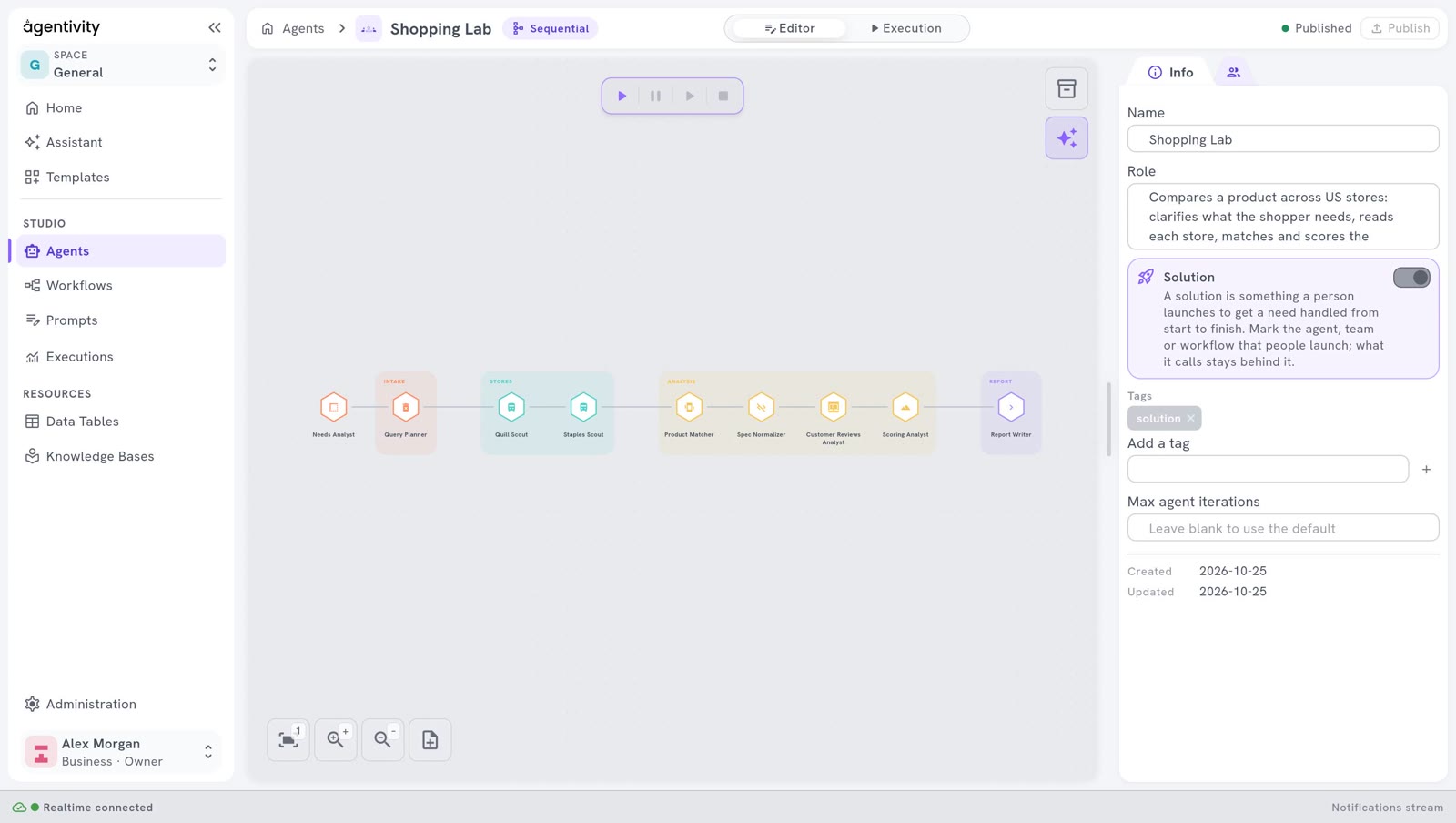
Each member has a role of one sentence, its own instructions and only the tools its job needs.
- Needs Analyst. Turns a vague wish (“good headphones for the train, not too expensive”) into a precise brief: the product, the budget, the must-haves and what matters most. It is the only member that asks the shopper questions, and the search starts once the shopper confirms the brief.
- Query Planner. Prepares the search for each store from the brief.
- First store scout. Reads the pages of the first store and reports prices, ratings, reviews and specifications.
- Second store scout. Does the same for the second store. Both scouts read the stores’ own pages with a web reader that needs no paid service.
- Product Matcher. Finds the same product in both stores, merges it, and checks the must-haves.
- Spec Normalizer. Builds a side-by-side comparison in the same units. It never fills a gap with a guess: a missing figure stays missing.
- Customer Reviews Analyst. Says what customers think, from the reviews the scouts collected, and where to be careful.
- Scoring Analyst. Scores every product with a script, never by estimation. The same inputs always give the same score.
- Report Writer. Writes the final report: a verdict, the top picks, charts, the comparison and the sources. It hands the report back without asking anything.
Why nine experts and not one assistant
- One job each. A short role is easier to get right, and easier to check, than one long instruction that tries to cover everything.
- Rules where they matter. The score comes from a script, so it does not drift from one execution to the next. The spec normalizer is told never to guess, so the report never shows a figure the store did not publish.
- One voice to the shopper. Only the needs analyst talks to the person. The seven members in the middle work only from what is in the tables, and the report writer delivers without a last round of questions.
- Easy to change. You can add a third store, or score on other criteria, by changing one member, without rewriting the rest.
How they pass the work
The team is Sequential: each member works after the one before, and builds on what it produced. That is one of the five ways AI experts work together, the simplest one, and a good fit when the steps always come in the same order.
The members also keep their results in five data tables. The scouts write what they found, the matcher reads it and writes the matched products, the normalizer reads those, and so on to the report. The tables make the work visible: after an execution, you can open them and see exactly what each member found, matched and scored.
A person decides twice: when the shopper confirms the brief, and when they read the report and choose what to buy. Where a person should stay in charge is its own question, covered in human in the loop.
What you would change for your own case
Shopping Lab is a shape as much as a demo: clarify, collect, match, compare, score, report. The same shape fits many jobs.
- Other stores. Copy a scout and point it at another store. Check first that the store’s terms of use allow its pages to be read this way.
- Other criteria. Change the scoring script to weigh what matters to you: delivery time, warranty, energy use.
- Something other than products. Suppliers’ offers, software plans, training courses: the needs analyst, the scouts and the scorer change their instructions, and the shape stays.
- Your own data. Instead of a public store, a scout can work from your own catalogue kept in a data table.
If you are not sure whether your job needs a team at all, start with chatbot, agent, team or workflow: which one do you need?
Good to know
- Nothing is simulated. The scouts read the stores’ real public pages. The demo is written for two stores in the United States and works in English.
- Pages change. The stores are real websites. If a store changes its pages, a scout can find nothing there.
- It costs model calls. Nine members work, and several of them make several calls to the AI model, so an execution is longer and uses more calls than one question to an assistant.
Try it
The free trial includes the ready-made solutions. Add Shopping Lab from the welcome guide, open it in the Studio, switch to Execution, and ask for a product with a budget. The needs analyst asks you a few questions first.
Start a free trial: 14 days, no card.
Ready-made
This solution is a Template.
See what is inside, then add it to your workspace.
See the TemplateQuestions people ask
Are the prices and products real?
Yes. The two scouts read the stores' own public pages at the moment of the execution. Nothing is simulated. The demo is written for two stores in the United States and works in English, and a store page can change, in which case a scout may find nothing.
Why not ask one AI assistant to do the whole comparison?
Because the job has steps that need different rules: one asks the shopper, two read pages, one puts specs in the same units without guessing, one scores with a script. Split into roles, each step is short, checkable, and can be changed without touching the others.
Can I compare other stores, or something other than products?
Yes. Copy a scout and change its instructions to read another store, after checking that the store's terms allow its pages to be read this way. To compare offers, suppliers or plans, keep the shape: clarify, collect, match, compare, score, report.
Do I need to build this team myself?
No. Shopping Lab is one of the ready-made solutions you can add from the welcome guide or from Templates, then open, run and change.