
Install it yourself
Free foreverThe Community edition runs on your own server with Docker. For people comfortable with a command line.
Build
TeamsAI specialists that work together AgentsOne specialist, one role, its own tools WorkflowsFixed steps, with a person who approvesHow it works
Tell the Assistant, in your own words. It shows a plan, builds a draft, and you check, change and save it. Or build by hand in the Studio, when you want full control. Everything happens in your browser.
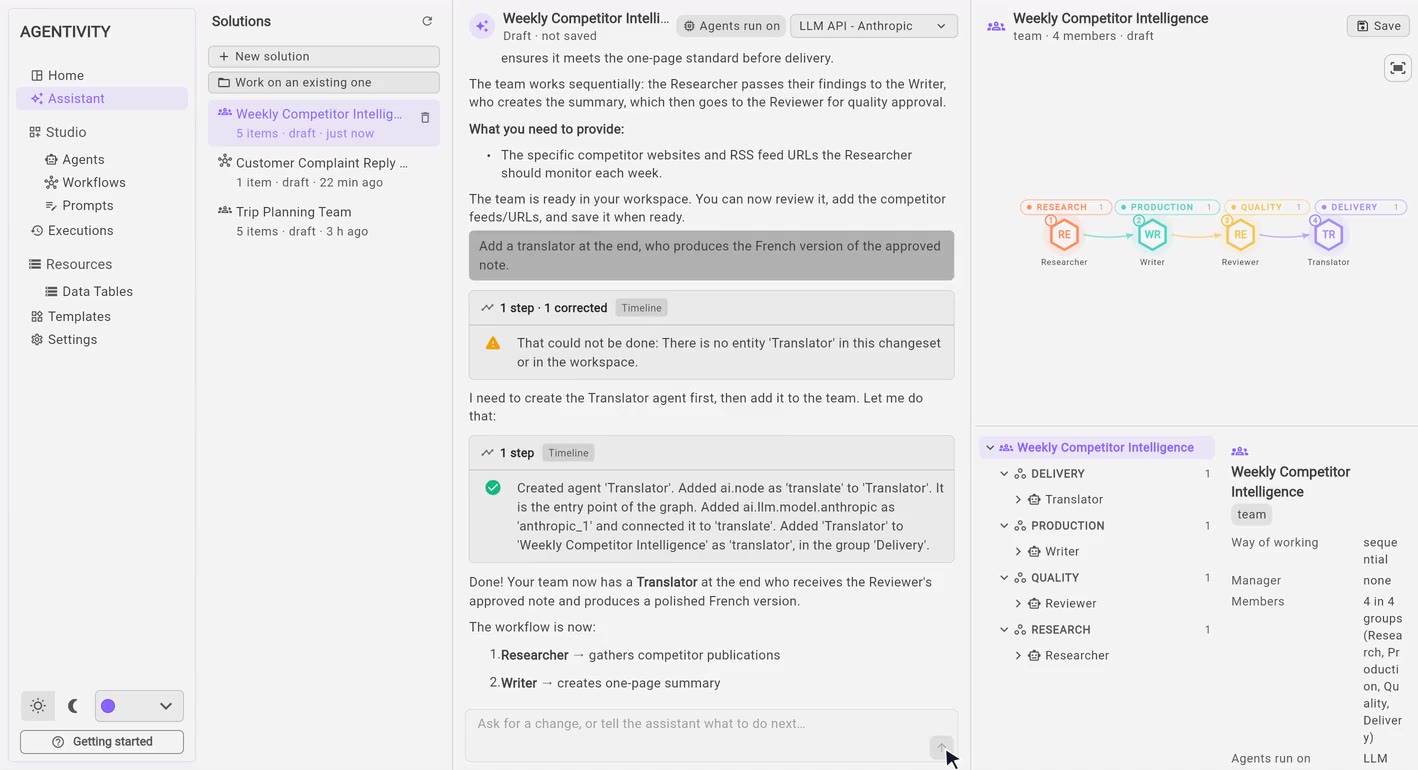
The fast way
Describe it the way you would to a colleague. The Assistant asks what it needs to know, shows you a plan, then builds a draft you can look at, change and save. It is part of the Studio, in the Community edition.
See the Assistant in detail →Three things you can ask
Nothing is saved until you say so. And what it builds is an ordinary team you can open and adjust by hand.
Full control
The Studio gives you everything the Assistant uses, and nothing the Assistant builds is hidden: it is an ordinary agent, team or workflow. Build from nothing, or open what it made and change it. These three steps are the same either way.
An agent is one AI specialist. Give it a name, then describe its role in plain words, as you would for a new colleague.
Name the team, choose how its members work together, then drag in the specialists you need.
Five ways to work together
When the steps must be the same every time, draw them: questions to ask, rules to apply, approvals to wait for. AI works only in the steps you choose.
You explain, it adapts: the right skills, at the right moment. They ask in their own words, and the team stops when a decision is theirs. Pick a moment to jump to it.
Your turn
The Community edition runs on your own server with Docker. For people comfortable with a command line.
Nothing to install: sign in and build your first team.
Questions people ask
It is the part of the Studio where you describe what you need and it builds a team, an agent or a workflow for you. It asks questions, shows a plan, and builds a draft you review and save. You can still build everything by hand.
No. You describe what you need to the Assistant, or you build in the Studio with names, plain-word descriptions and drag and drop. Two things do need a technical colleague: installing the Community edition on a server, and building a VibeApp of your own.
The one you choose: OpenAI, Anthropic, Gemini, DeepSeek, xAI or AWS Bedrock. You can change it later.
With the Community edition, nothing leaves your server unless you connect a service. When an AI step runs, what you send in that step goes to the model provider you chose, under its terms.
No. It takes the repetitive work and comes back to your people for the decisions. The judgment stays with those who know the job.
Nothing to install: start free in the cloud.
14 days free · no credit card