
The Assistant
Describe it. The Assistant builds it.
You say what you need, in your own words. The Assistant asks what it needs to know, shows a plan, then builds a draft you can look at, change and save. No technical knowledge needed.
Included in the Community edition, free forever.
What you can ask
Create it. Change it. Challenge it.
Three things, in the same conversation. Each clip below is the Studio itself, played faster.
Create
One sentence is enough to start. The Assistant asks only what it needs to know, and shows its plan before it builds anything.
You sayA team of three that prepares, every week, a one-page note on what our competitors published: a researcher, a writer and a reviewer.
- You describe what you need
- It asks a question, with choices to pick from
- It shows a plan in plain words: go ahead, or change something
- It builds a draft and draws it as it goes
Modify
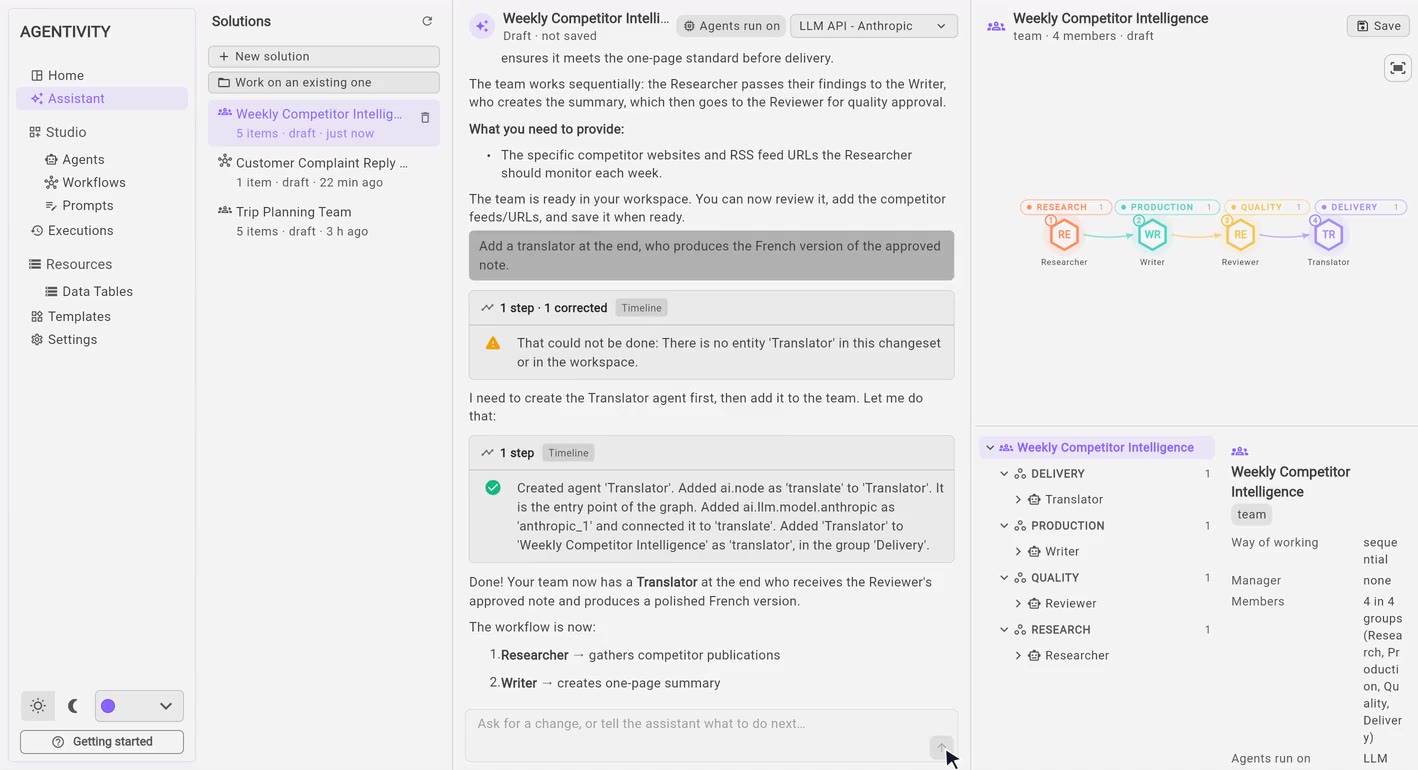
Ask for a change in the same words, from the main sidebar or from the editor of what you built. The Assistant adds the member, connects it, checks the result and tells you what changed.
You sayAdd a translator at the end, who produces the French version of the approved note.
- Add a member to a team
- Make the instructions clearer and more precise
- Add something to what you already have
Challenge
Ask for a second opinion. You get what could go wrong, and what it would change, before anything runs.
You sayChallenge this team: what could go wrong, and what would you change?
- What could go wrong, point by point
- What it would change for each one
- Your choice: rebuild with some of it, all of it, or none
Not instead of the Studio
Then take it by hand.
What the Assistant builds is an ordinary team, agent or workflow in your workspace. Open it in the Studio and adjust it the way you always could. Or skip the Assistant and build from nothing: both stay available.
See how to build by hand →- You save: you see what is added, and choose where it goes
- It lands in your workspace like anything you built yourself
- Open it in the editor to change it, publish it, run it
Your call
It proposes. You decide.
- A plan before anything is built It shows what it intends to build, in plain words, and waits for your go-ahead.
- A draft, not a change Nothing is saved until you save. Until then, nothing in your workspace moves.
- Checked before you save It checks what it built. An error stops the save; a warning is for you to weigh.
- Your keys stay yours It sees the name of your model connection, never its secrets.
Worth knowing
What to expect, honestly.
- It drafts, you review.
- A first version is rarely the last. Read the plan, look at the result and try it on a real case, as you would with a new colleague's work.
- It tells you what is missing.
- In the example above it reminded us to provide the competitors' website addresses. That part is yours.
- It corrects itself, in the open.
- When it gets a step wrong, you see it, and you see the fix.
- It uses your AI model.
- It works through the model connection you set up, so what you write goes to that provider, under its terms, and its usage is billed to you by that provider.
Questions people ask
Before you try it.
Is the Assistant part of the Community edition?
Yes. It is in the Studio, in the free Community edition. It needs a connection to an AI model, which you set up once.
Do I need to know how to code, or what a workflow is?
No. You describe what you need in your own words, and the Assistant answers in the words of your work, not technical ones.
Can I use it on something I already built?
Yes. The Assistant is in the main sidebar and in the agent, team and workflow editors: open one of yours and launch the Assistant to improve it, or start from the Assistant and pick the one to work on. It opens in a new conversation, and nothing changes until you save.
Does it replace building by hand?
No. The Studio is unchanged. The Assistant is the fast way to a first version, to a change, or to a second opinion. Anyone who prefers to draw it themselves still can.
Which AI model does it use?
The connection you choose: OpenAI, Anthropic, Gemini, DeepSeek, xAI or AWS Bedrock. You also choose which model the agents it builds will run on, and you can change it later.
Is what I write sent to Agentivity?
No. With the Community edition everything runs on your server. What you write goes only to the AI model provider you connected.
Try it on your own server.
The Community edition is free forever, and the Assistant is part of it.
Rather not install anything? Start free in the cloud