
Supplier invoices arrive as PDFs: software, travel, office supplies, equipment. Someone opens each one, types the supplier, the number, the dates and the amounts into a spreadsheet, adds up the lines to check the total, and tries to remember whether this invoice was already entered or whether it is a reminder of an old one. It is careful work, and it is the same work every time.
That is a job for one AI agent, not a team. Invoice Clerk reads each invoice you upload, files it in a table, checks its figures with a calculator, spots duplicates, and shows a short summary with a chart of the spending by category.
It is one of the ready-made solutions in Agentivity: you can open it, run it on fictitious invoices and change it. Try it in a free trial, no card.
One agent, three tools, one table
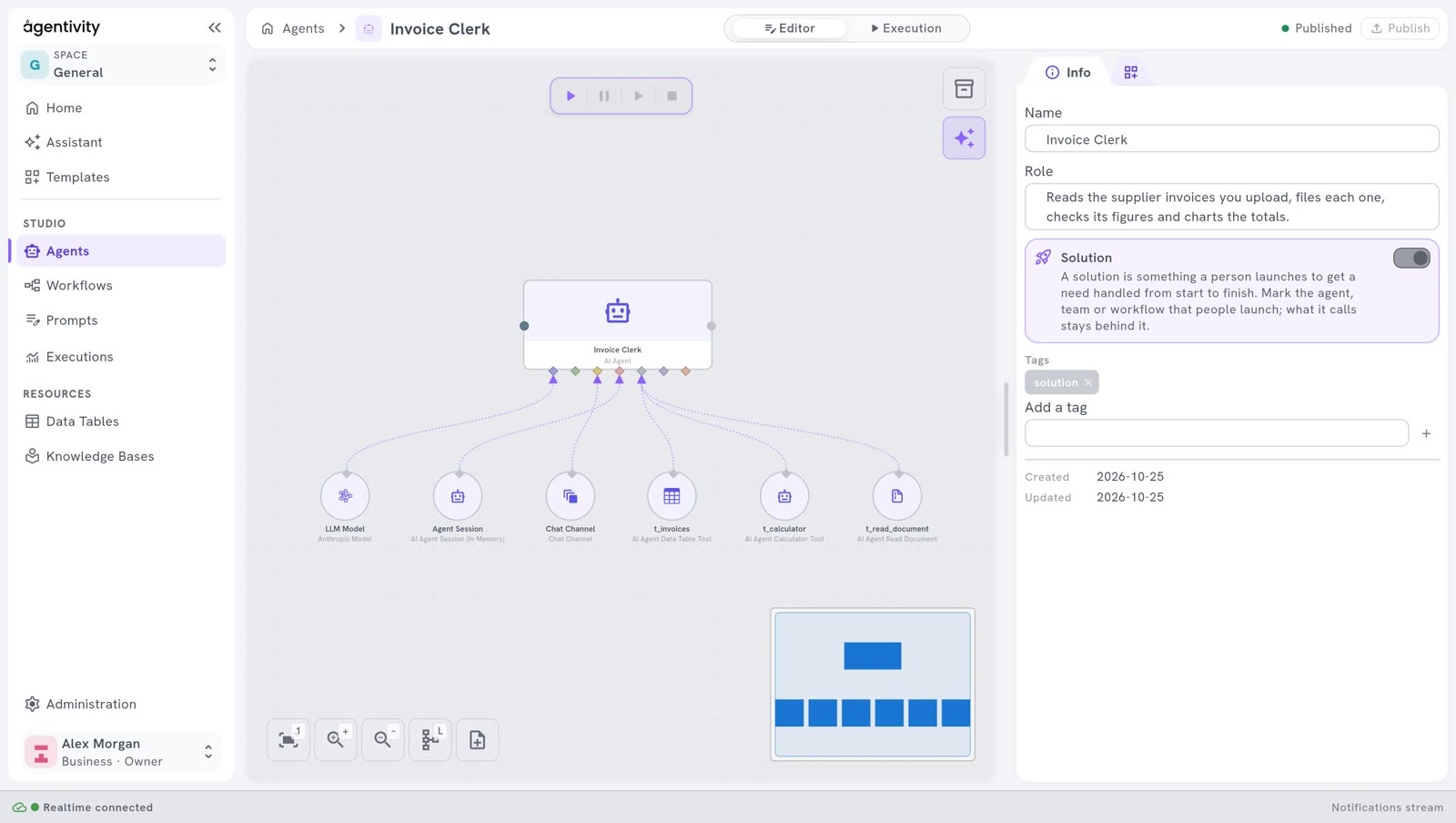
Invoice Clerk is the smallest of the ready-made solutions. Below the agent, six things are plugged in:
- A model, the AI it thinks with.
- A chat channel, the conversation where you upload the invoices and see the result.
- A session memory, so it remembers the invoices it has already seen in the conversation.
- A document reader, to read the PDF or Word file you upload.
- A calculator, to add up the figures.
- A data table tool, to read and fill the table
invoices: one row per invoice, with the supplier, the number, the dates, the currency, the amounts, a category, a one-line summary, the result of the check and the total the agent computed.
The agent understands the document. The tools do the parts that must be exact.
What it does, step by step
The instructions of the agent are written as numbered steps, in plain words. For each invoice:
- It asks for the invoice, with an upload box: a PDF, a Word file, or pasted text.
- It reads it. If the file cannot be read, for example a scanned image with no text, it says why in one sentence and asks again.
- It extracts the fields: supplier, invoice number, dates, currency, amount before VAT, VAT, total, a category and a one-line summary. A value the invoice does not give stays empty, never a guess.
- It checks the arithmetic with the calculator, never in its head: the lines against the subtotal, and the subtotal plus VAT against the printed total.
- It looks for a duplicate: the same supplier and the same invoice number already in the table.
- It files the invoice in the table, unless it is a duplicate.
- It shows the result: a summary card with the total and the check, a warning when the figures do not add up, and a chart of the spending by category, read from the table, so the chart always matches what is filed.
- It asks for the next one, until you say you are done.
Record, do not correct
The most important rule is about a total that does not add up. The agent never fixes the figure. It keeps the total exactly as the invoice prints it, stores its own sum next to it, and marks the invoice as a mismatch.
In the demo set, an invoice from a fictitious stationer lists three lines that add up to 214.80 EUR before VAT, and 42.96 EUR of VAT: 257.76 EUR in all. The invoice prints 267.76 EUR. The agent files 267.76 EUR as printed, shows a warning with both figures, and leaves the decision to a person: pay, or ask the supplier.
That is what a careful clerk does. An invoice is a document from someone else: the figure on it is a fact to record, and a gap is something to raise, not to hide.
Duplicates and reminders
Suppliers send reminders, and a reminder often carries the same invoice number as the first invoice. Before it files anything, the agent looks for the same supplier and the same number in the table. If it is there, it files nothing, says when the first one was filed, and shows the chart as it stands. The invoice is counted once.
When one agent is enough, and when it is not
A team of AI experts is the right shape when a job needs several specialities: Shopping Lab has nine members because reading two stores, matching products, normalising specifications and scoring are different jobs with different rules. Invoice Clerk does one person’s job, the same way every time. Adding agents would add hand-overs, not quality. The exact parts, the sums and the filing, are given to tools.
One agent stops being enough when the work goes further than filing:
- Approval before payment. If every invoice over an amount must be approved by a person, put the agent in a workflow with an approval step. Where a person should decide is its own question, covered in human in the loop.
- Several kinds of work. Chasing late invoices, preparing the monthly report, answering suppliers: each is a job of its own, and a team with one member per job keeps each set of rules short.
If you are not sure which shape your job needs, start with chatbot, agent, team or workflow: which one do you need?
What you would change for your own case
- Your columns. Change the columns of the table to match what your accounting needs: a cost centre, a project, a purchase order number. Then change the instructions to match.
- Your categories. The demo uses six: Software, Travel, Office, Equipment, Services, Other. Replace them with your own.
- A question to a person. Add a channel that asks someone when the check fails, instead of only flagging the invoice.
- Other documents. The same shape fits receipts, expense notes or delivery notes: read, extract, check with a calculator, file, report.
Good to know
- Use fictitious invoices first. The demo set is fictitious: the suppliers, the buyer and the people do not exist.
- The content of each invoice is sent to your AI model provider when the agent reads it. Check that provider’s terms before you use real invoices.
- It files and checks, nothing more. It pays nothing and sends nothing to a supplier or to accounting software.
- You upload the invoices. The agent reads what you give it in the chat.
Try it
The free trial includes the ready-made solutions. Connect your AI model with your own key, add Invoice Clerk from the welcome guide, open it in Studio > Agents, switch to Execution, and upload an invoice. Then open Data Tables > invoices: the invoice has its row.
Start a free trial: 14 days, no card.
Ready-made
This solution is a Template.
See what is inside, then add it to your workspace.
See the TemplateQuestions people ask
Does the agent correct a wrong total?
No. It records the total exactly as the invoice prints it, stores its own sum next to it, and flags the invoice as a mismatch. A person decides what to do with the supplier.
Can it pay the invoices or send them to my accounting software?
Not as delivered. Invoice Clerk files and checks; it pays nothing and sends nothing. Its table can be read by a workflow that does the next step, with a person who approves.
What files can I give it?
A PDF or a Word file with text in it, or the text of the invoice pasted in the chat. A scanned image with no text cannot be read: the agent says so and asks again.
Where does the invoice data go?
The table stays in your workspace: on your own server with the Community edition, or in your hosted workspace. The content of each invoice is sent to your AI model provider when the agent reads it.
Why one agent and not a team?
Because the job is one person's job done in the same order every time: read, extract, check, file, report. The exact parts are done by tools, not by more agents. A team helps when the work needs several specialities or decisions along the way.