
What a workflow is made of
Ce contenu n’est pas encore disponible dans votre langue.
A workflow is a set of steps that you draw in advance. The steps run in the order you drew, the same way every time. This page explains the parts of a workflow, so that the other pages of this section are easier to follow.
In these pages, the example is a workflow named Reminder Approval. It asks a person whether a payment reminder can be sent, and continues according to the answer.
Why use a workflow
Section titled “Why use a workflow”An agent or a team decides by itself how to handle a request. That is useful when the cases are many and different. A workflow is for the opposite need: the path is known, and it must be followed.
- The same steps, every time.
- Rules that always give the same result. A condition takes the same path for the same input.
- A person who approves before the work continues.
- AI only where you want it. One step can be an agent or a team; the others are fixed.
The parts
Section titled “The parts”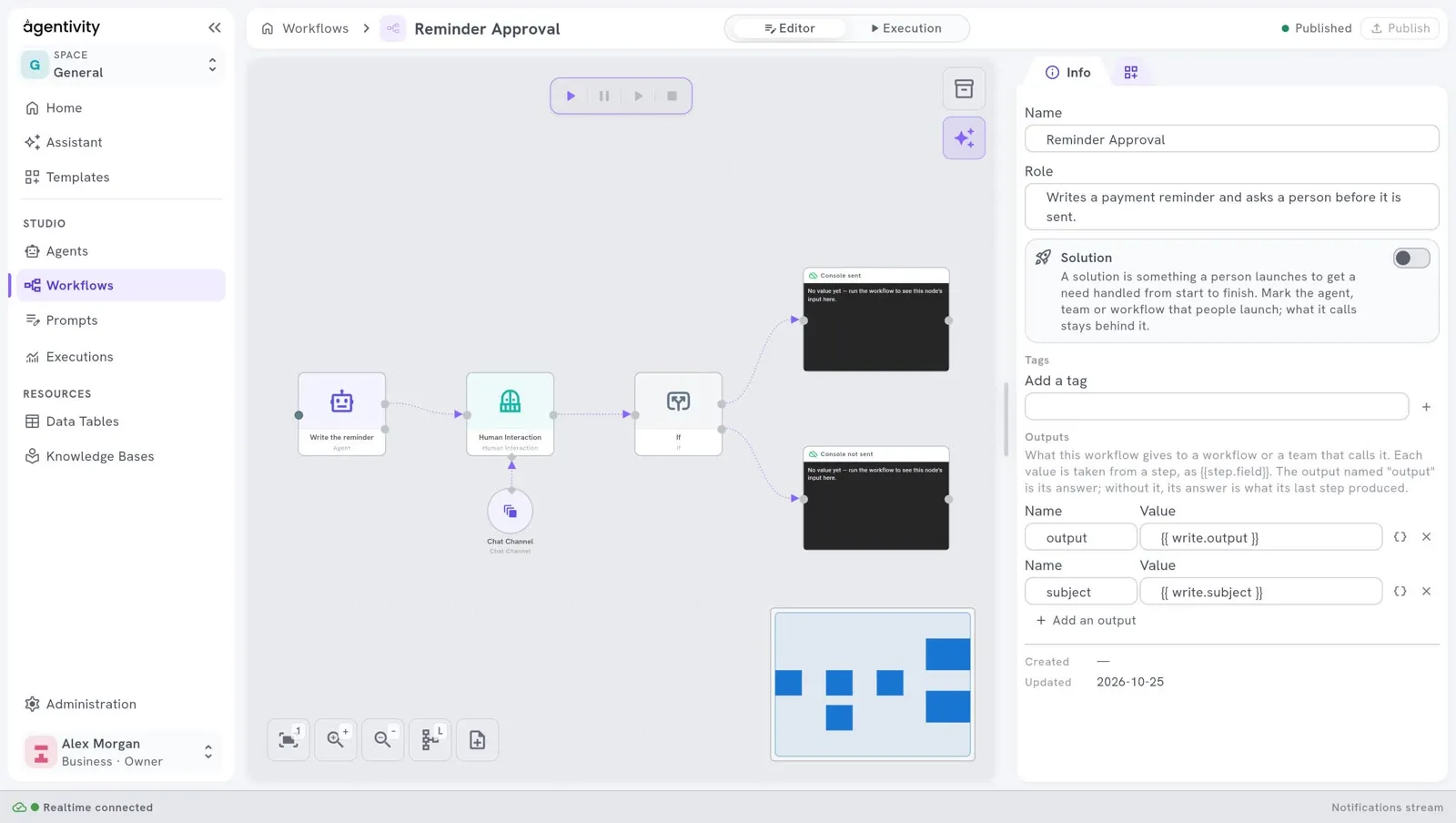
| Part | On the canvas | What it is |
|---|---|---|
| Step | A box | One thing the workflow does: ask a person, test a condition, call an AI model, write a row. The Studio calls it a node. |
| Link | An arrow from one dot to another | The order: when the first step is finished, the second one starts. |
| Resource | A circle | Something a step uses: an AI model, a channel to reach a person, a data table. It is not a step. |
| Plug | A dotted line from a diamond to a diamond | Gives a resource to the step that uses it. |
A step has a dot on its left, where the work comes in, and one or several dots on its right, where it goes out. A step with several exits, such as a condition, has one dot for each path.
How values pass from step to step
Section titled “How values pass from step to step”Each step produces outputs: named values that the next steps can use. For example, the step that asks a person produces the answer.
In the window of a step, the panel Outputs lists the outputs of the steps before it, with their exact names. You use an output in a field by writing its reference: the name of the step, a dot and the name of the output, between two pairs of curly braces.
A field can hold:
- a Fixed value: what you type is used as it is;
- an Expression: the value is computed when the workflow runs.
The kinds of steps
Section titled “The kinds of steps”The Nodes catalog sorts the steps by category.
| You want to | Look in | Page |
|---|---|---|
| Ask a person to approve or answer | Interactions | Ask a person to approve or answer |
| Ask a person to fill in several fields | Interactions | Ask a person to fill in a form |
| Take one path or another | Core > Control Flow | Add a condition to a workflow |
| Let an AI model work in one step | AI > Agents | Add an AI step to a workflow |
| Read or write a table | Core > Data | Read and write a Data Table from a workflow |
| See a value while you build | Core > Display | Run a workflow and follow each step |
How a workflow starts
Section titled “How a workflow starts”A workflow starts when a person starts it in the Studio, or when an application asks for it. Starting a workflow on a schedule is planned, and it is not available yet.