
Shopping Lab, nine agents one after another
Ce contenu n’est pas encore disponible dans votre langue.
Shopping Lab helps a shopper choose a product. It clarifies the need, reads the pages of two online stores, compares the offers, scores them and writes a report with the best picks. It is a Sequential team: nine agents work one after another.
What it contains
Section titled “What it contains”| Element | What it is |
|---|---|
| The team Shopping Lab | A Sequential team of nine members. |
| Nine agents | One per step of the work. |
| Five data tables | Where the agents keep and pass their results. |
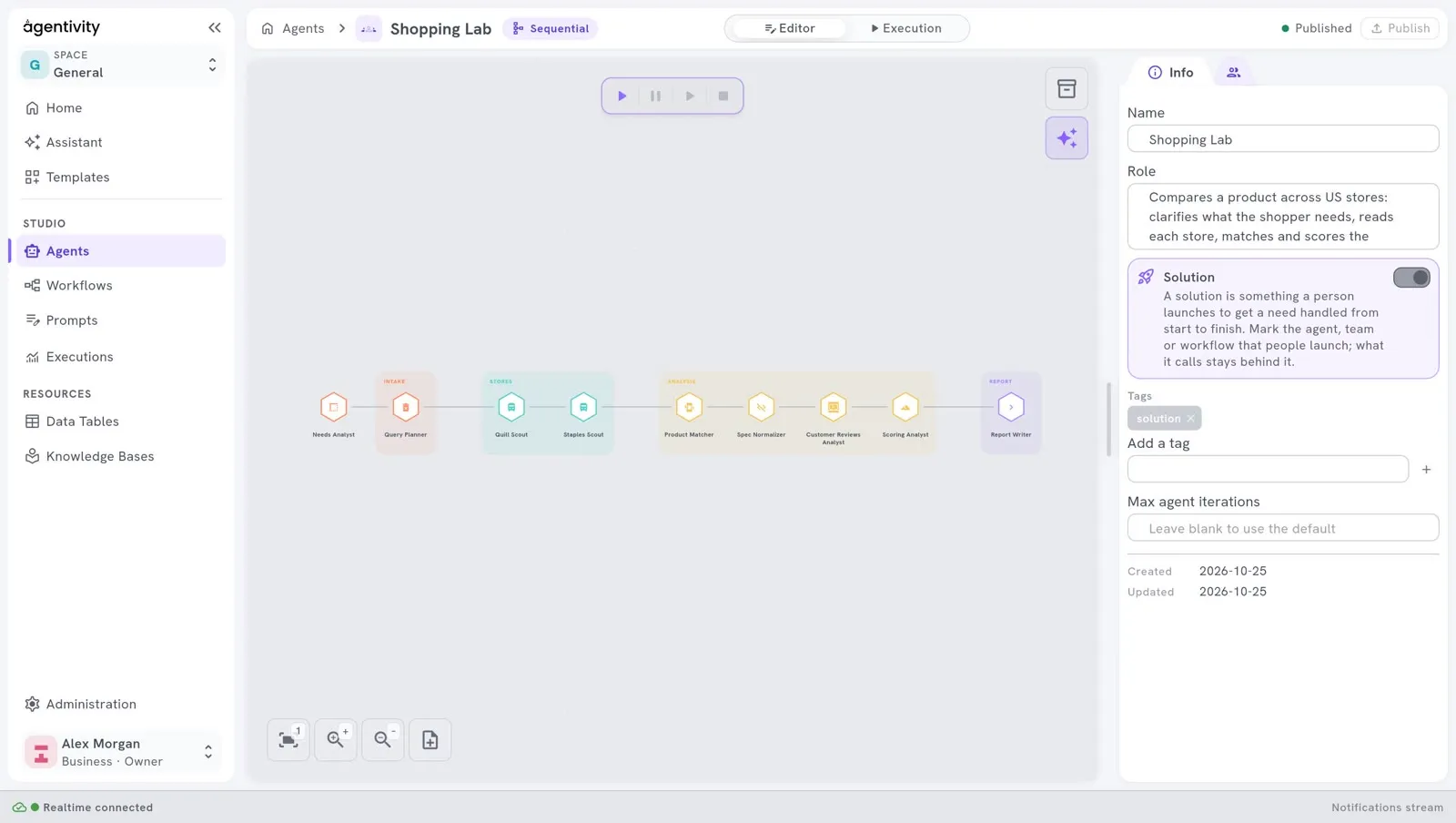
The nine members, in order
Section titled “The nine members, in order”| # | Member | What it does |
|---|---|---|
| 1 | Needs Analyst | Turns a vague wish into a precise brief: product, budget, must-haves. It is the only member that asks the shopper questions. |
| 2 | Query Planner | Prepares the search for each store from the brief. |
| 3 | Quill Scout | Reads the pages of the first store and reports prices, ratings, reviews and specifications. |
| 4 | Staples Scout | Does the same for the second store. |
| 5 | Product Matcher | Merges the same product found in both stores, and checks the must-haves. |
| 6 | Spec Normalizer | Builds a side-by-side comparison in the same units. It never fills a gap with a guess. |
| 7 | Customer Reviews Analyst | Says what customers think, from the reviews collected. |
| 8 | Scoring Analyst | Scores every product with a script, never by estimation. |
| 9 | Report Writer | Writes the final report: verdict, top picks, charts, comparison, sources. It sends the report without asking anything. |
What to look at
Section titled “What to look at”- One job per agent. Each role is one sentence. Read the roles in the team, then open two or three agents and read their instructions.
- Only one member asks questions. The Needs Analyst asks the shopper at the start. The Report Writer shows the report at the end, without asking anything. The seven others work only from what is in the tables.
- The tables carry the work. In a Sequential team, each member receives what the previous one produced. Here the agents also write their results in tables, and the next ones read them. Open Resources > Data Tables to see the five tables.
- A script for the scores. The Scoring Analyst has a tool that runs a small program. The same inputs always give the same score. This is how to get a result that does not vary from an AI team.
- Groups. The members are sorted in four groups: Intake, Stores, Analysis and Report. See Name, group and give an icon to team members.
- Reading web pages. The two scouts have the tool AI Agent Web Scraper Tool (Direct), which reads a page without a paid service.
Try it
Section titled “Try it”- Open Studio > Agents and open the team Shopping Lab.
- In the switch at the top, select Execution.
- Ask for a product, with a budget. The Needs Analyst asks you questions first.
See Run a team and read its work.
An execution uses the AI model many times: nine agents work, and several of them make several calls.
Make it yours
Section titled “Make it yours”- To compare other stores, copy a scout and change its instructions. Check first that the terms of use of the store allow its pages to be read this way.
- To compare something other than products, keep the shape: clarify, collect, match, compare, score, report.
Good to know
Section titled “Good to know”- The stores are real websites. Their pages can change, and a scout can then find nothing.
- The showcase is written for stores in the United States, and it works in English.