
The Home page of the Studio
The Home page is the first screen of the Studio. It greets you by your first name, for example “Good morning, Alex”, and says in one sentence what the week looked like. It lets you start something new, and it shows what your workspace did recently.
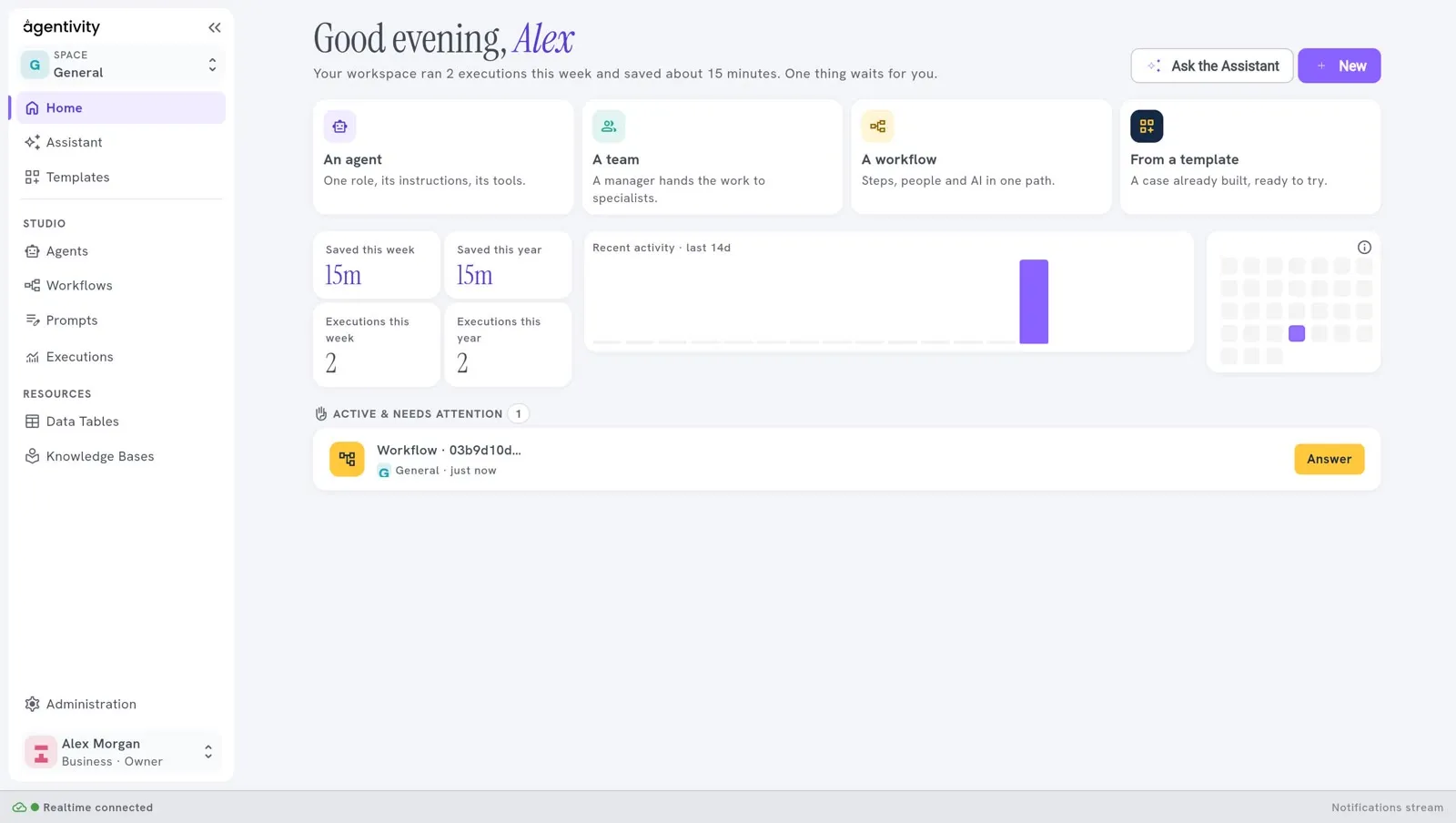
The two buttons
Section titled “The two buttons”At the top right:
- Ask the Assistant opens the Assistant, to build from a description. See Build your first team with the Assistant.
- New opens a menu: Agent, Team or Workflow. Each one asks for a name.
The four cards
Section titled “The four cards”| Card | What it does |
|---|---|
| A workflow | Asks for a name, then opens a new workflow in its editor. See Create a workflow. |
| An agent | Asks for a name, then opens a new agent in its editor. See Create an agent. |
| A team | Asks for a name, then asks how the members work together. See Create a team of agents. |
| From a template | Opens the Templates screen. |
The counters
Section titled “The counters”| Counter | What it counts |
|---|---|
| Executions this week, Executions this year | The number of executions of your agents, teams and workflows. |
| Saved this week, Saved this year | An estimate of the time these executions saved, in minutes. |
The recent activity
Section titled “The recent activity”- Recent activity · last 14d is a chart with one bar per day, for the last fourteen days.
- The grid next to it shows the activity over a longer period, one square per day. Move the pointer over a square to read the date and the time saved. The small i at its corner explains the grid.
Active & needs attention
Section titled “Active & needs attention”This block lists the executions that are in progress and the executions that need you. A running execution and a failed one carry a label, Running or Failed. An execution that waits for a person has the button Answer, which opens it so that you can reply. When there is nothing, it says “Nothing running and nothing waiting on you right now.”
For the complete list of executions and their state, open the Executions screen.