
Trip Manager Team, a manager and its specialists
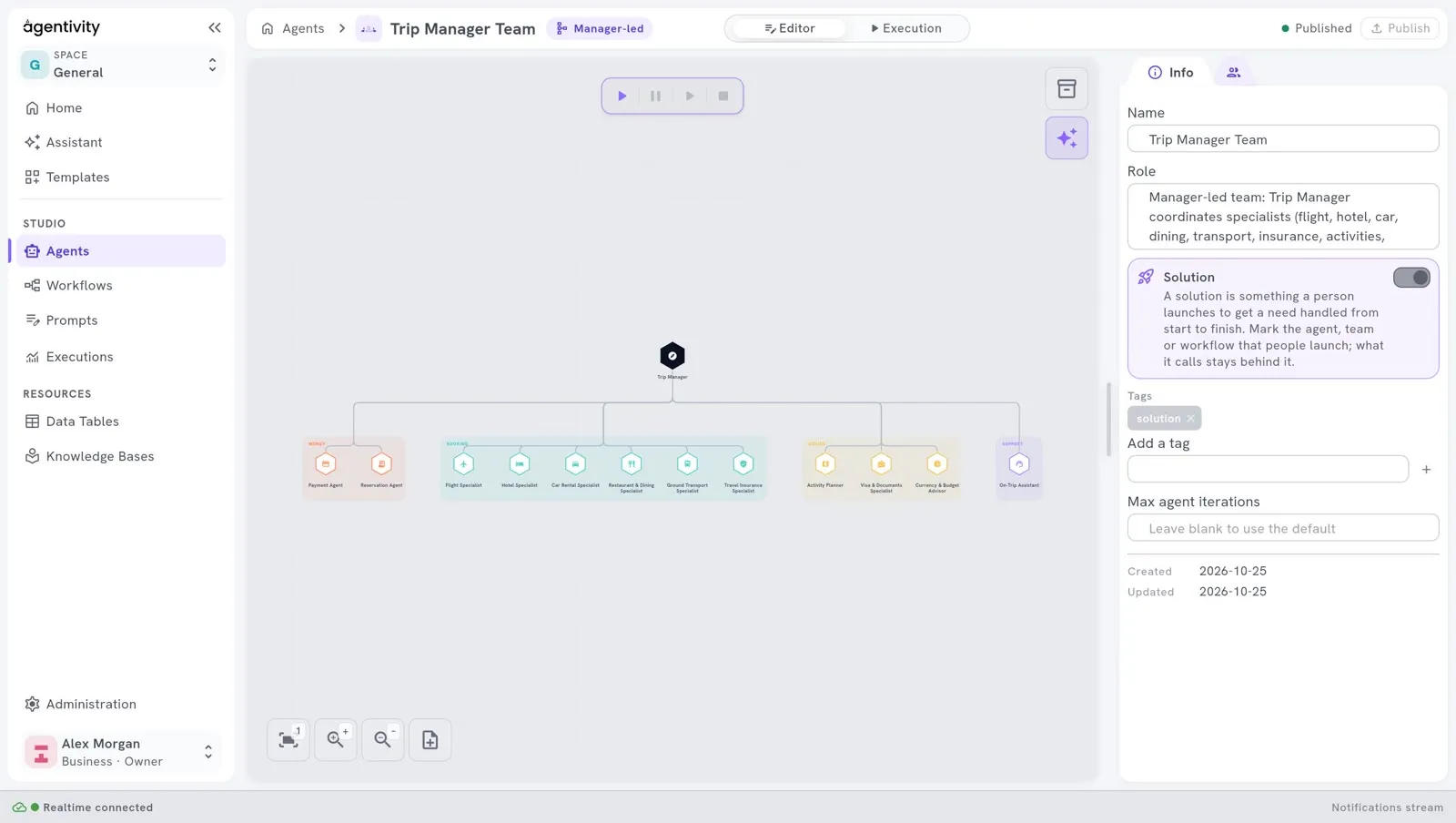
Trip Manager Team plans a complete trip with the traveller: flights, hotel, car, dining, transfers, insurance, activities. It is a Manager-led team: a manager decides which specialist works next.
Everything is simulated. No real booking is made and no real payment is taken: each specialist plays the part of a booking service.
What it contains
Section titled “What it contains”| Element | What it is |
|---|---|
| The team Trip Manager Team | A Manager-led team of thirteen members. |
| Thirteen agents | The manager and twelve specialists. |
The table trips | One row per trip: destination, dates, travellers, budget, itinerary. |
The table trip_bookings | One row per booking of a trip: its kind, its label, its status. |
The members
Section titled “The members”| Member | What it does |
|---|---|
| Trip Manager | The manager. It talks with the traveller, and sends each part of the trip to the right specialist. |
| Flight Specialist, Hotel Specialist, Car Rental Specialist, Restaurant & Dining Specialist, Ground Transport Specialist, Travel Insurance Specialist | Each proposes options in its field. They only propose: they do not book. |
| Activity Planner, Visa & Documents Specialist, Currency & Budget Advisor | They inform: an itinerary of activities, the documents needed, the budget. |
| Payment Agent | Handles the simulated payment, and says whether it was authorised. |
| Reservation Agent | Records every reservation with a confirmation code, once the payment is authorised. |
| On-Trip Assistant | Handles changes after the trip is confirmed. It is not used during planning. |
What to look at
Section titled “What to look at”- The manager at the top position. In a Manager-led team, the member at the top is the manager. See Choose how a team works together.
- The roles decide who works. The manager chooses a specialist from its role. Read the roles in Studio > Agents: each one says what the agent handles, and what it does not do. “Proposals only” and “Never used during initial planning” are instructions for the manager.
- Every member has a chat channel. Each of the thirteen agents can show something to the traveller or ask a question.
- A gate before the bookings. The Reservation Agent records the reservations only after the Payment Agent reports an authorised payment. The order is written in the roles and the instructions.
- Groups and icons. The members are sorted in four groups: Booking, Advice, Money and Support. Each member has an icon. See Name, group and give an icon to team members.
Try it
Section titled “Try it”- Open Studio > Agents and open Trip Manager Team.
- In the switch at the top, select Execution.
- Ask for a trip in one sentence: a city, the dates, the number of travellers and a budget.
- Answer when a specialist shows options.
See Run a team and read its work.
An execution uses the AI model many times: the manager and each specialist that works.
As an application
Section titled “As an application”Trip Planner is an application built on this team. Its source is published as an example for developers. See One app for one job, or one portal for all, and watch it on the use cases page.
Make it yours
Section titled “Make it yours”This team is a model for any request that has several parts and one person who decides: organising an event, preparing an offer, welcoming a new employee. Keep the shape: one manager, specialists with narrow roles, and a clear rule for what happens last.